

How to create your perfect Substack profile picture in just 40 seconds
The only Substack profile picture guide you'll ever need, and the quickest to act on

Howdy, Wealth Gang🤠

Before someone reads your first word on Substack, they’ve already judged you.
Your profile picture is doing more work (or damage in some cases) than you think, but 95% of creators still treat it like an afterthought.
That’s why today I show you how to create the perfect profile picture in just 40 seconds.
This is Part 2 of the Perfect Substack Profile series, in Part 1, we covered your Substack name, if you missed it, go read that here.
Now it’s time to fix the face. :)
By the end of this article you’ll know:
✓ The 3 Ways You Lose Trust Through Your Profile Picture
✓ The 3 Rules Of A Perfect Profile Picture
✓ The 4-Step Action Guide To Fix Your Profile Picture In 40 Seconds

The 3 Ways You Lose Trust Through Your Profile Picture
Most creators pour hours into their writing and then slap a 240p selfie from 2019 as their profile picture.
Or worse… they leave the default avatar in there.
A bad profile picture sends signals you don’t even realize you’re sending.
1. Low resolution?
Tells visitors of your profile you don’t pay attention to details.
2. Face not clearly visible?
Readers can’t connect with a silhouette. Humans are wired to look at faces and if yours isn’t clear, they move on.
3. Background color that clashes with your publication’s color scheme?
This one is sneaky.
Nobody’s going to consciously think: “hmm, that blue background doesn’t match their black and white newsletter.” But unconsciously, they’ll feel like something is off. The branding feels random and their trust drops without them knowing why.
The 3 Rules Of A Perfect Profile Picture
Rule 1: Show Your Face. Clearly.
Substack is a personal publishing platform. People subscribe to 👉you👈.
Displaying a random logo instead of your face as a PP creates distance from the start.
And when I say clearly, I mean it. Cropped tight enough that your face takes up most of the frame. Not a full-body shot where you’re a tiny figure in the distance.
If someone has to zoom in to see you, you’ve already lost them.
“But what if I don’t want to show my real face?”
A high-quality illustration or a consistent character that represents you works, as long as it’s intentional, recognizable, and consistent across your whole profile.
Best example Finn Tropy.
Rule 2: Match Your Colors
Your profile picture doesn’t exist in isolation.
It sits next to your banner and publication. If everything in your Substack is black and white, but your profile picture has a random bright orange background, people feel the misalignment.
The fix is to simply use your publication colors as your profile pic background.
“But i’m not a designer, I have no idea how to do that.”
Don’t worry, in the next section I’ll show you a free tool that lets you set this up in 40 seconds.
(No design skills required)
Rule 3: Your Face Expression Is Your Brand Energy
This one’s personal.
My mentor once told me to change my profile picture. Said I looked unprofessional, smiling with a missing tooth.

I told him no.
Looking professional is genuinely not my vibe.
My brand is positive, warm, and I don’t take myself too seriously. My gap-toothed smile is the brand. If I swap it for a stiff corporate headshot, I become someone I’m not and the people I actually want to attract won’t feel it.
Your face expression should match your energy.
Warm and approachable? Smile like you mean it.
Serious and authoritative? Look the part.
Weird and funny? Let it show.
The 4-Step Action Guide To Fix Your Profile Picture In 40 Seconds
Go to picofme.io (It's free, there are no ads, and you don't need to create an account.)
Step 1: Upload your photo
Any decent photo of your face works. Good lighting helps and make sure you’ve got the matching facial expression we talked about.
Step 2: Let AI remove your background
One click and AI cuts you out cleanly and you’re left with just your face, ready to drop onto any background you desire.
Step 3: Set your brand color as the background
Now the AI will give you a bunch of versions you can scroll through.
Choose one that feels right to you then click on “customize” to nail down the details.
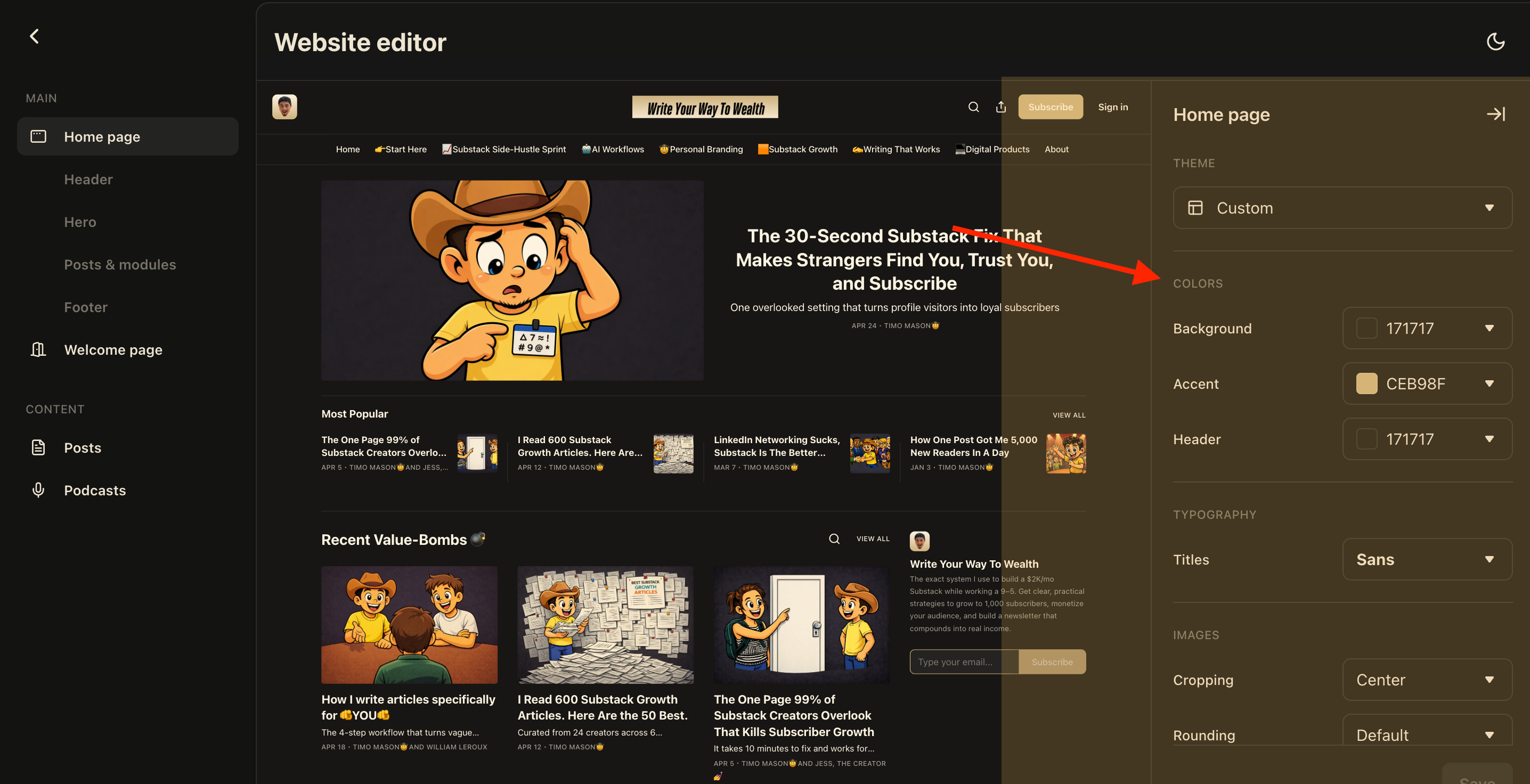
There you can click on “background” and add the exact color code of your publication as your background.
If you’re not sure what the color code is, you can go to your Substack settings where you find the “Website editor” and there you will find the section “Colors” with the exact color codes that are used in your publication.
Step 4: Download and upload to Substack
Click on “Download” open up your Substack profile settings and upload it there. :)
I recorded the whole 4-step process so you can just follow along, I did it in 40 seconds flat:
Now you got a clean, professional profile picture that actually fits your brand. :D
Takeaway
Your profile picture is the first thing people see before they decide if you’re worth their time.
Get your face in there. Match your brand color. Let your expression do the talking.
And if you’re sitting there with a blurry selfie or a 👤default avatar👤 right now, you’ve got everything you need to fix it in the next 40 seconds.
Go to picofme.io, follow the steps above, and get it done today.
This article is part 2 of the Perfect Substack Profile series.
Part 1 was the perfect Substack profile name, read it now if you missed it.
Next week, we will talk about the perfect profile banner, so stay tuned.
If you liked this article, you will love the Substack Side-Hustle Sprint.
A free 5-day masterclass I created to go from Substack newbie to having a foundation for a $2K/month Substack business that replaces your 9-5.
Subscribe to Write Your Way To Wealth and get the Substack Side-Hustle Sprint for free.
See ya soon
Timo Mason🤠
P.S. I have no type of affiliation with picofme.io / It’s just a really cool tool. :)

Liked this post? 2 ways you can support me
Share it with a creator friend who will benefit.
Ask a question or share your thoughts in the comments.
thanks for the quick, simple actionable tips and fixes, Timo!
This is genuinely useful because it focuses on one visible problem and gives people a fast way to fix it.
A lot of creators treat their profile picture like dead space when it is actually part of the first impression they are making before anyone reads a word. The reminders here about clarity, consistency, and making sure your expression matches your actual brand energy are the strongest parts for me.
I also especially like that you did not reduce “professional” to “stiff corporate headshot.” A profile picture should build recognition and trust, yes, but it should still feel like the person behind the publication. Otherwise you polish away the very thing people might connect with.
Simple, practical, and easy to act on.