
Is Content Chaos Killing Your Substack Growth?
Here's my simple system that puts your entire publishing workflow in one place


Howdy, Wealth Gang🤠
Everyone in the Substack growth space loves flexing their numbers.
“My newsletter grew 300% in 90 days.“
“I gained 500 subscribers this month.“
“Just hit 10K subs.“
They hook you with the results, then tell you the formula:
“Engage with others 15 minutes a day.“
“Post articles at least once a week.“
“Drop daily notes.“
Okay, cool, but how do you manage all that content when you have 2 hours after work and a brain that’s already fried?
You’re not a full-time creator with unlimited time.
You’re writing between meetings, drafting on your lunch break, and trying to remember that genius idea you had at 11 PM last Tuesday.
Meanwhile, these growth experts act like content management is just... automatic.
They’ll tell you what to post and how often to post it, but nobody ever explains:
Where should your ideas go when you think of them at random times?
How do you plan a month of content when you can barely plan tomorrow’s dinner?
How do you keep track of what you’ve already written about so you’re not repeating yourself?
They give you the growth strategy, then leave you drowning in the execution.
So today we will fix that, once and for all. :D
In this article, you’ll learn:
✓ The 4 critical problems in Substack’s native scheduler
✓ The 4 components of every successful content system
✓ The exact setup that helped me reach 1,000 subscribers
By the end, you’ll understand why “just posting more“ doesn’t work without the infrastructure to support it.
And you’ll have a clear roadmap for building a system that actually lets you publish consistently without losing your mind.
Let’s go! :)
Why Substack’s Native Scheduler is not enough
Substack’s built-in scheduler works fine if you’re publishing one article every couple of weeks.
But the second you try to scale up with :
Daily Notes
Weekly articles
Collaboration posts
It falls apart like a house of cards.
Here’s what’s missing:
Problem #1: No Notes Management
Substack’s scheduler doesn’t support Notes at all.
That means no way to see what you’ve posted or to schedule your next notes.
You’re basically winging it every single day, hoping you remember to post.
Problem #2: No Idea Capture System
You get a genius article idea during lunch break.
Where does it go?
If you create a draft in Substack, your drafts folder becomes a mess of half-baked ideas mixed with actual articles you’re working on.
If you use your Notes app instead, now you have ideas scattered across multiple places with no system to organize them.
Either way, you end up losing ideas or forgetting which ones you already wrote about.
Problem #3: No Visual Calendar
Substack shows you a chronological list of posts.
That’s it.
No calendar view where you can see your entire month at a glance.
No way to visually plan your publishing rhythm.
You’re managing your content schedule blind.
Problem #4: Zero Collaboration Features
Substack’s editor doesn’t support real-time collaboration.
If you’re writing with another creator, you have to:
Copy the draft into Google Docs
Share it
Get feedback
Copy it back into Substack
Fix the broken formatting
Re-upload everything
It’s inefficient, kills momentum and adds a mess to your Google docs also.
The Real Problem
Substack is not build to manage serious content operations.
If you try to do it with the native system you end up with content chaos across Substack, Google docs and your notes app.
The solution is one streamlined system, where you have a perfect overview of everything that matters.
That means:
✓ A goal-setting space to set and track your monthly targets (articles, Notes, subscribers)
✓ An idea capture system so genius thoughts don’t die in random apps
✓ A visual content calendar to see your entire publishing schedule at a glance
✓ An organized writing workspace separated by content type (Notes, articles, guest posts)
✓ A collaboration-friendly setup that doesn’t require copy-pasting between three different tools
Substack gives you exactly zero of these things.
But if you’re serious about growing and monetizing your Substack to 2K/month so you can finally leave your 9-5 a system like this is essential.
Now, I will walk you through my entire content management system that helped me reach 1,000 subscribers, so you know exactly what yours needs. (feel free to copy mine)
The 4 Components Every Substack Creator Needs
If you want to publish consistently without losing your mind, your content system needs four core components.
These aren’t optional “nice-to-haves.“
They’re the infrastructure that separates creators who are still stuck at 50 subscribers after 6 months and the ones who manage to replace their 9-5 with a solid Substack biz.
Here’s what your system must include:
Component #1: Goal Center
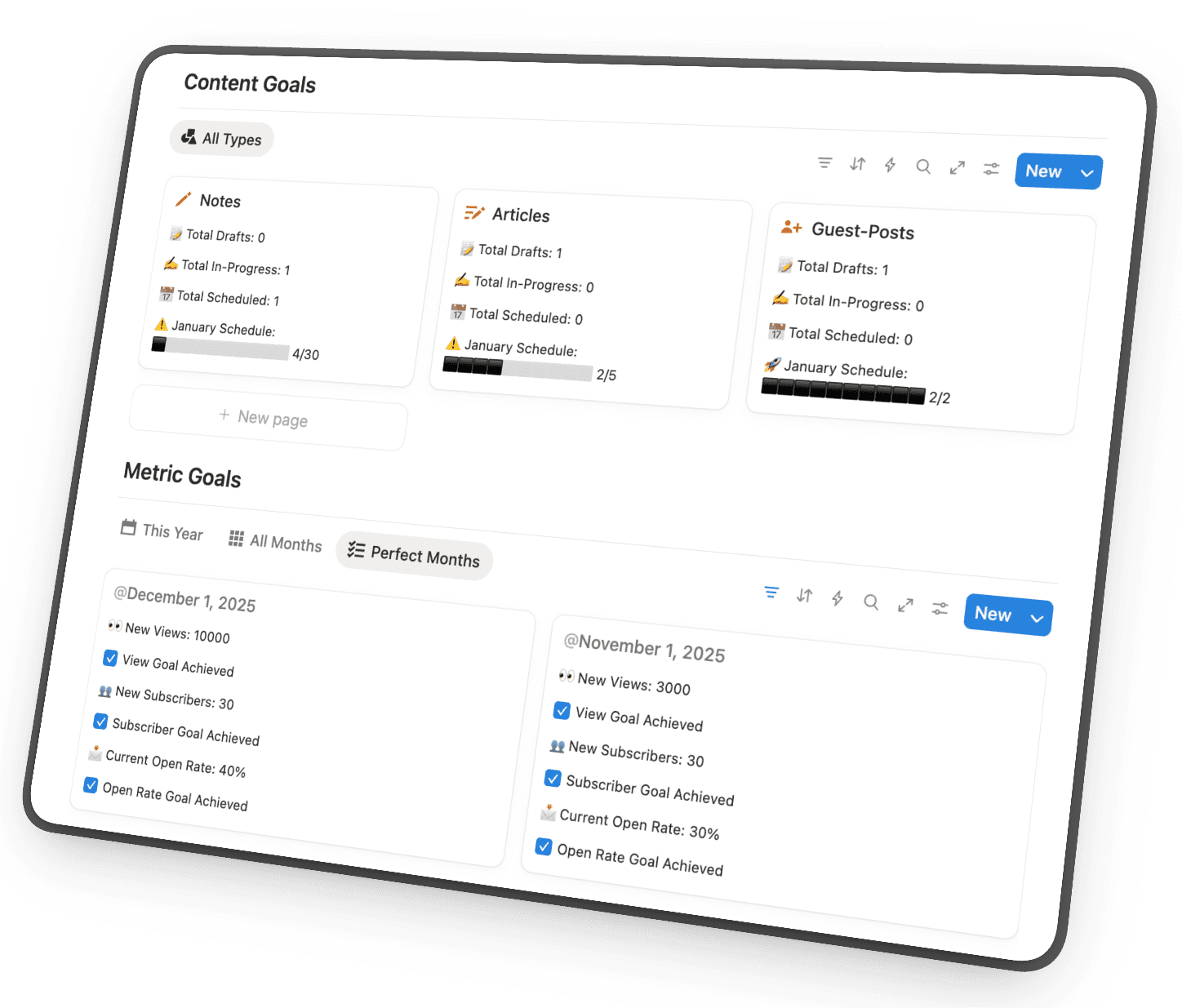
You need a dedicated space to set and track your content goals.
Not vague goals like “post more“ or “grow my audience.“
Specific, measurable targets:
How many articles are you publishing this month?
How many new subscribers are you aiming for?
How many Notes you push out?
Without clear goals, you’re just creating content and hoping something sticks.
With them, you can actually measure whether your consistency is paying off.
What this workflow looks like in practice:
At the start of each month, you set your targets.
Throughout the month, you track progress.
At the end, you review what worked and adjust for next month.
Component #2: Inspiration Library
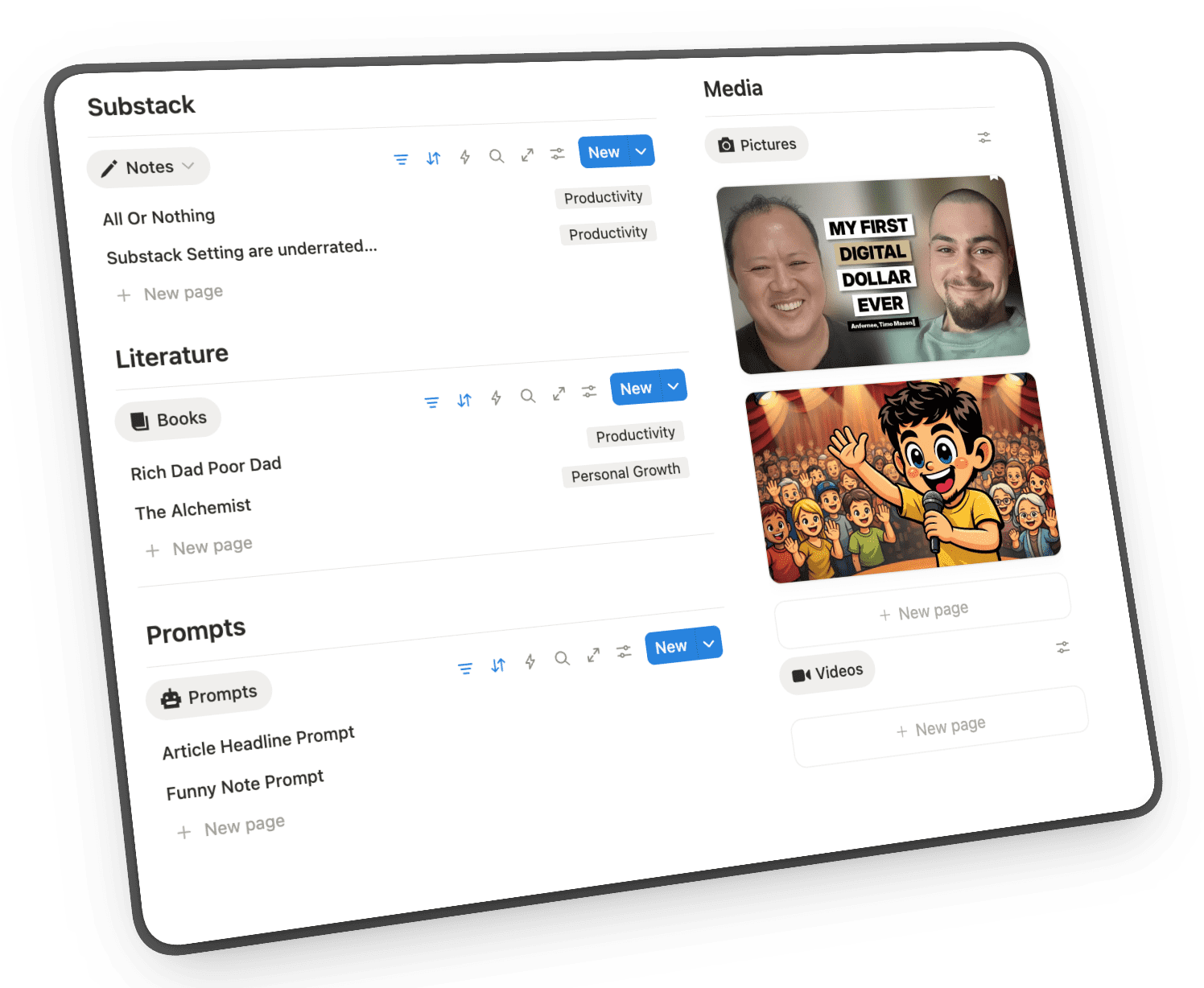
You need one central home for everything that sparks content ideas.
Not scattered across your Notes app, browser bookmarks, and random screenshots.
One place where you store:
✓ Photos and videos you want to reference in articles
✓ Articles and Substack Notes that inspire you
✓ AI prompts that work well for your content
✓ Books and quotes you want to reference
The goal is simple: When you sit down to write, you never waste 15 minutes hunting for “that thing you saved somewhere.“
Everything that feeds your content lives in one organized space.
Component #3: Writing Room
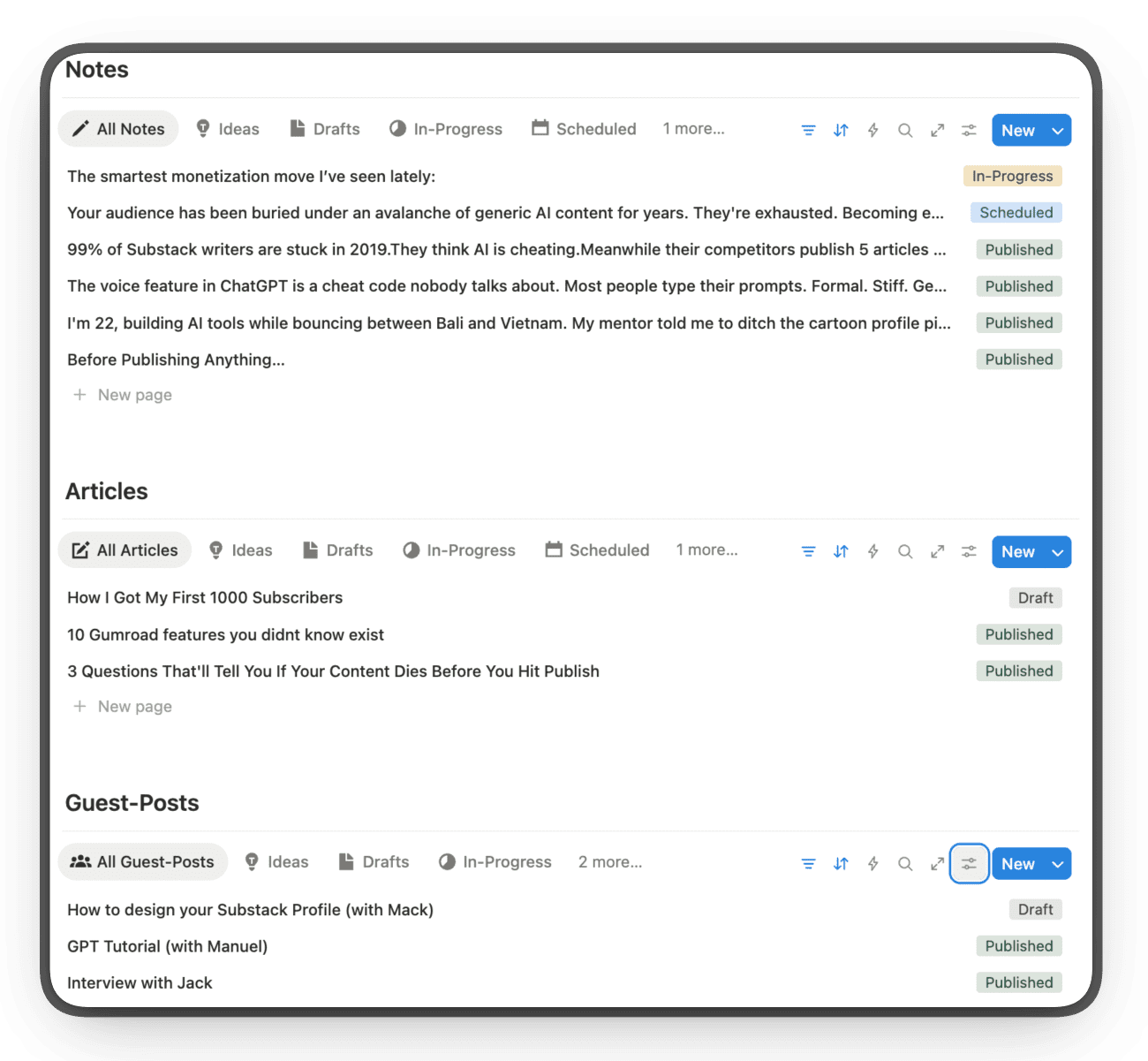
You need a workspace organized by content format.
Not one chaotic folder where articles, Notes, and guest posts are all mixed together.
Separate sections for:
Notes - Your daily short-form content
Articles - Your weekly long-form pieces
Guest Posts - Collaborations with other creators
Each section shows you what’s in progress, what’s scheduled, and what’s published.
No more opening Substack and scrolling through an endless list trying to find that draft you started last week.
You know exactly where everything is and what stage it’s in.
Component #4: Content Calendar
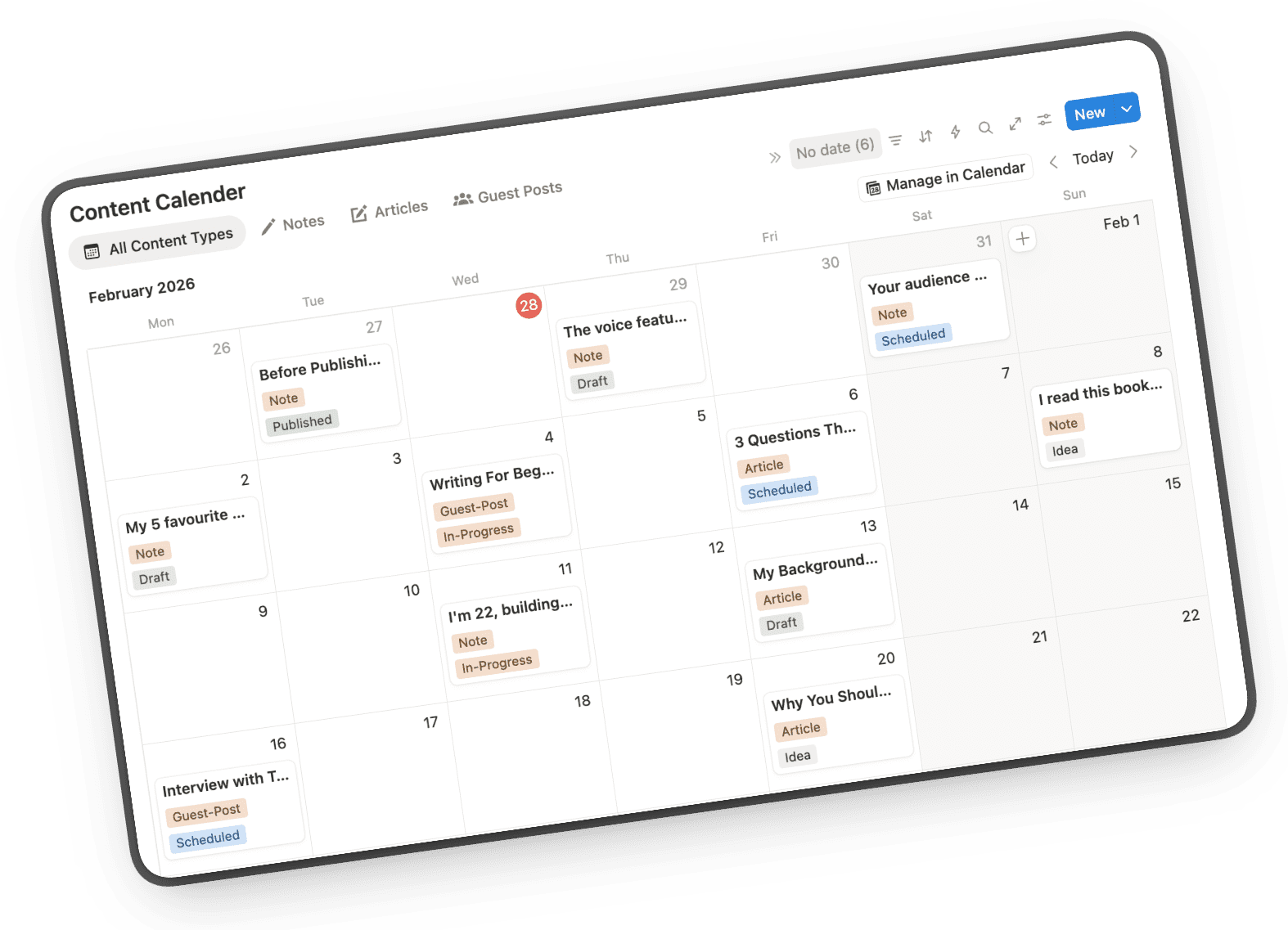
You need a visual overview of your entire publishing schedule.
Not a mental checklist you’re trying to keep track of.
Not a list of dates that means nothing at a glance.
An actual calendar where you can see:
What you’ve already published this month
What’s scheduled for next week
What gaps you need to fill
Filter by content type (articles vs Notes), see everything at once, and never lose track of your publishing rhythm again.
When a creator friend asks “What are you working on this week?“ you should be able to answer instantly.
That’s what a visual calendar gives you.
These four components work together to eliminate content chaos.
The Goal Center tells you what you’re aiming for, so you’re not just posting randomly and hoping for growth.
The Inspiration Library makes sure you never run out of ideas, even when your brain is fried after a full workday.
The Writing Room organizes your creation process, so the 90 minutes you have after dinner actually go toward writing, not hunting for drafts.
The Content Calendar keeps your publishing rhythm visible, so you can plan weeks ahead instead of scrambling every Sunday night.
Together, they make you go from:
“I’ll try to post this week if I have time“ into “I’m scheduled through the whole next month”
Build Your Own or Use Mine
Alright, now you know what a proper content management system needs:
So here’s where you have two choices:
Option 1: Build It Yourself
You can absolutely do this.
Open Notion (or whatever tool you prefer), set up these four components from scratch, and figure out the exact structure that works for you.
It’ll take around 10+ hours to build.
Maybe a few weeks to refine as you realize what’s missing or what’s not working.
But eventually, you’ll have a system that fits your workflow.
If you’ve got the time and energy to experiment, and love to figuring out everything from scratch, go for it.
Option 2: Use My System
Or you can skip the entire setup process.
I took my personal content management system (the one that helped me reach 1,000 subscribers) and made it available as a Notion template called Substack HQ.
What you’re getting:
✓ Goal Center (pre-structured for articles, Notes, and subscriber tracking)
✓ Inspiration Library (organized sections for photos, articles, prompts, books)
✓ Writing Room (separated by content type with status tracking)
✓ Content Calendar (visual planning with filters)
✓ Setup tutorial + video walkthrough
✓ Bonus: 3 Custom GPTs for content creation (Article-Into-Note, Headline Hero, Note Narrator)
This is my actual workflow—the one I rely on to publish 2 articles per week + daily notes while working on my business and traveling through Southeast Asia.
I spent months testing different structures and interviewing other creators to build this and now you can just copy it.
Eliminate content chaos in 5 minutes, grab Substack HQ here
Either way—whether you build your own or use mine—the important part is having a system.
Because without one, you’re just hoping consistency magically happens.
And spoiler alert: it doesn’t.
See ya soon
Timo Mason🤠
Liked this post? 2 ways you can support me
Share it with a creator friend who will benefit.
Ask a question or share your thoughts in the comments.
See ya soon
Timo Mason🤠